
How to edit or delete a mitigation rule
Update an existing mitigation rule or remove it from the table in a controlled way, with review, confirmation, and post-change service testing.
Updated 8/3/20264 min read
Edit a rule
Open the row action menu and select Edit. Review every field, not only the intended change: current validations apply and B/R require PPS. Save and wait for confirmation before reloading.
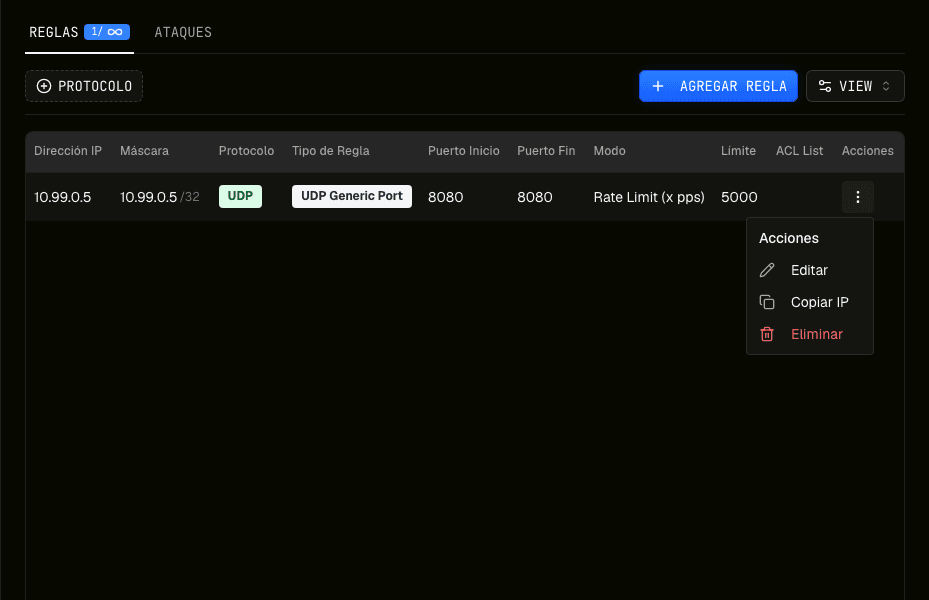
- 01Identify the rowCompare protocol, port, type, and mode.
- 02Open EditChange only planned values.
- 03Save and verifyWait for success and confirm the updated row.
Related guide: How to create a mitigation rule step by step
Delete a rule
Choose Delete from the same menu and review the confirmation dialog. The action completes only after the destructive dialog button is used. The table then updates or displays its empty state.
Post-change test
Reload the detail page to confirm persistence. Test connection, authentication, service functions, and relevant monitoring. If the outcome is wrong, restore the recorded configuration.
- The row shows new values
- A deleted rule stays absent after reload
- The service responds from valid sources
- Monitoring and logs show no regression
Frequently asked questions
Can a deleted rule be restored?
The table does not show a restore action. Keep the values so you can recreate the rule if needed.
Why does editing fail?
The rule is validated again. Check type, port or range, and required PPS for B and R.
