
logo
Contact

How mitigation-panel rules work

Understand protocols, rule types, ports, ranges, Allow, Block and Rate Limit modes, PPS limits and special rules before configuring protected traffic.

Updated 8/3/20264 min read

Rule anatomy

The IP identifies the protected target. Protocol separates TCP, UDP, and special cases. Rule type selects the countermeasure and may recommend known ports. Port can be a single value, an allowed range, or all ports when supported.
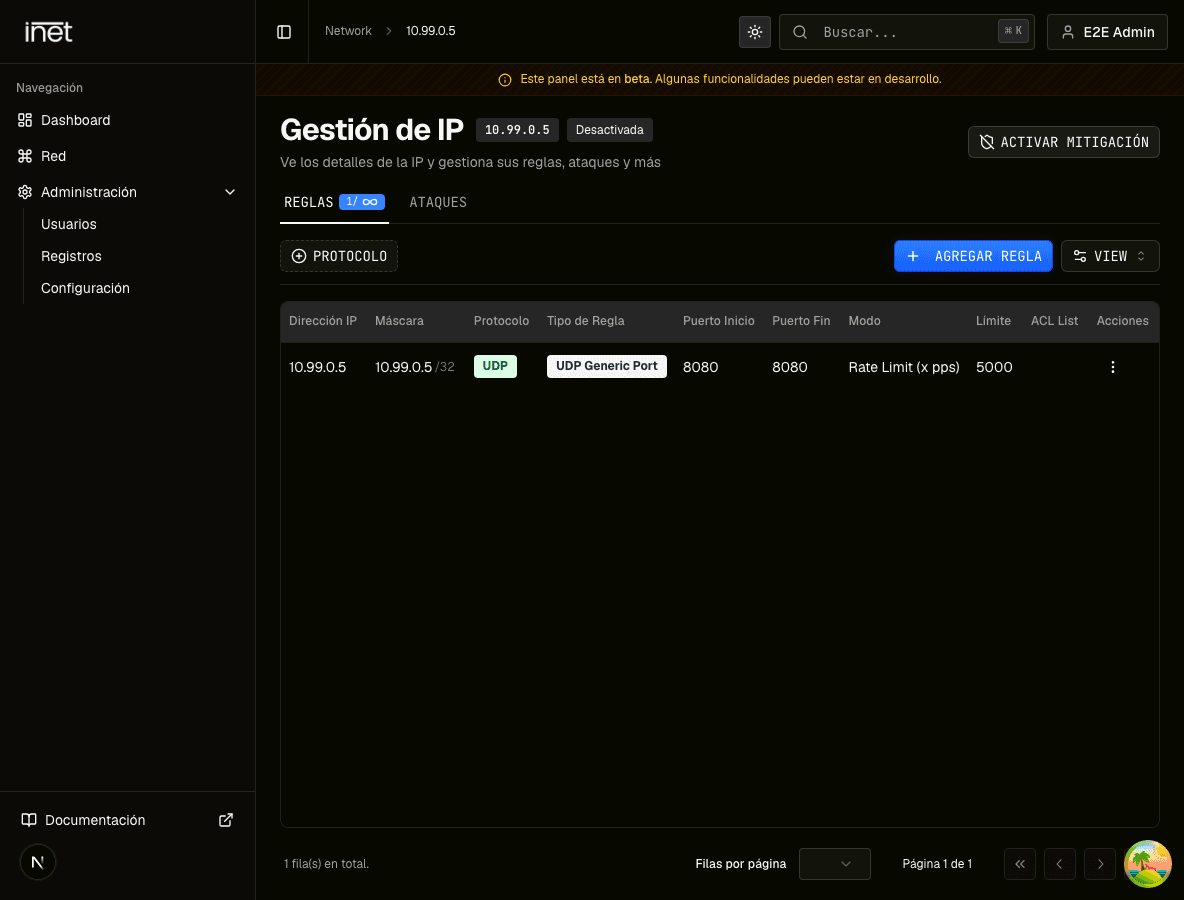
Rule table for a demonstration IP showing protocol, type, port, mode, and limit
The table summarizes the active combination. Confirm every value before editing it; the panel screenshot is in Spanish.
Main fields
Rule anatomyDefinesVerify
ProtocolTCP, UDP, or specialActual service transport
TypePreset or countermeasureApplication match
PortSingle, range, or allServer configuration

Related guide: How to create a mitigation rule step by step

A, B, and R modes

The interface labels A as Default (Allow), B as Block after x PPS, and R as Rate Limit. B and R require a positive PPS value, and the form displays the protocol maximum. This guide does not claim effects the panel does not describe.

General and special types

UDP Generic Port and TCP Service are general choices. Game presets include FiveM, MTA, Source, Minecraft, and Lineage 2. ICMP uses fixed port 0; TCP Passive may allow all ports; Drop All blocks all traffic and must be treated as high impact.

  • Port 0–0 is displayed as All ports
  • Drop All forces all ports and protocols
  • Allow All and sensitive types may not appear for your account
  • The IP rule counter shows the current limit

Frequently asked questions

Which mode applies without a threshold?

The interface marks A, Default (Allow), as the initial option. Confirm the operational need before switching to B or R.

Can every type use a port range?

No. A type can allow one port, a range, a fixed value, or all ports. The form shows and validates available choices.

Sources

  1. inetHost — Panel de mitigación
  2. inetHost — Cloud VPS mitigado
  3. Cloudflare Learning Center — What is a DDoS attack?
How mitigation-panel rules work | inetHost